Chiropractic works great for neck and back problems, but it is highly effective for the entire body. Carpal tunnel syndrome or CTS is becoming a widespread health issue with so many working on computers, devices, phones, etc. Chiropractic is perfect for treating CTS. It relieves pain, loosens/stretches the ligaments, and promotes healing without meds. �
�
�
Carpal Tunnel
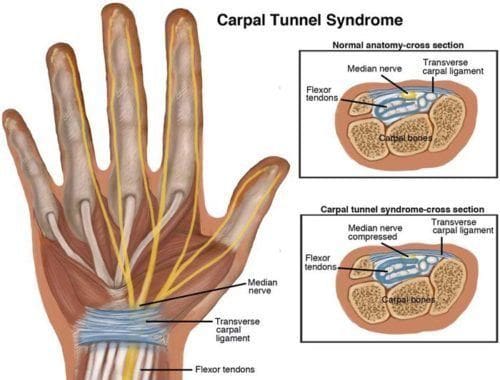
Carpal tunnel is diagnosed as a repetitive stress injury. This is a condition that affects the hands and wrists. The most common symptoms include:
Tingling
Numbness
Weakness in the middle, index, and thumb
Pain in the wrist/hand
Gets worse at night
It is found in:
Hairdressers
Office workers – typing, writing, filing, etc.
Mechanics
Cashiers
Those who perform repetitive hand motions throughout the day
It is estimated that around 3% of adults will deal with CTS at some time in their lives. Around 50 percent of workplace injuries are attributed to CTS. Research has shown that job occupation plays a large role in how it develops. �
�
The carpal tunnel lies on the front side of the wrist. Here is where the blood vessels, nerves, and tendons necessary for the hand to move and work reside. The carpal tunnel can become inflamed, damaged, or strained with added pressure on the area compressing the arteries and nerves. This is when CTS develops. It starts slowly with symptoms gradually worsening as the condition progresses.
�
How chiropractic helps
There are 3 primary ways that chiropractors treat carpal tunnel syndrome. Manual Adjustment of the:
Upper spine
Arm
Wrist
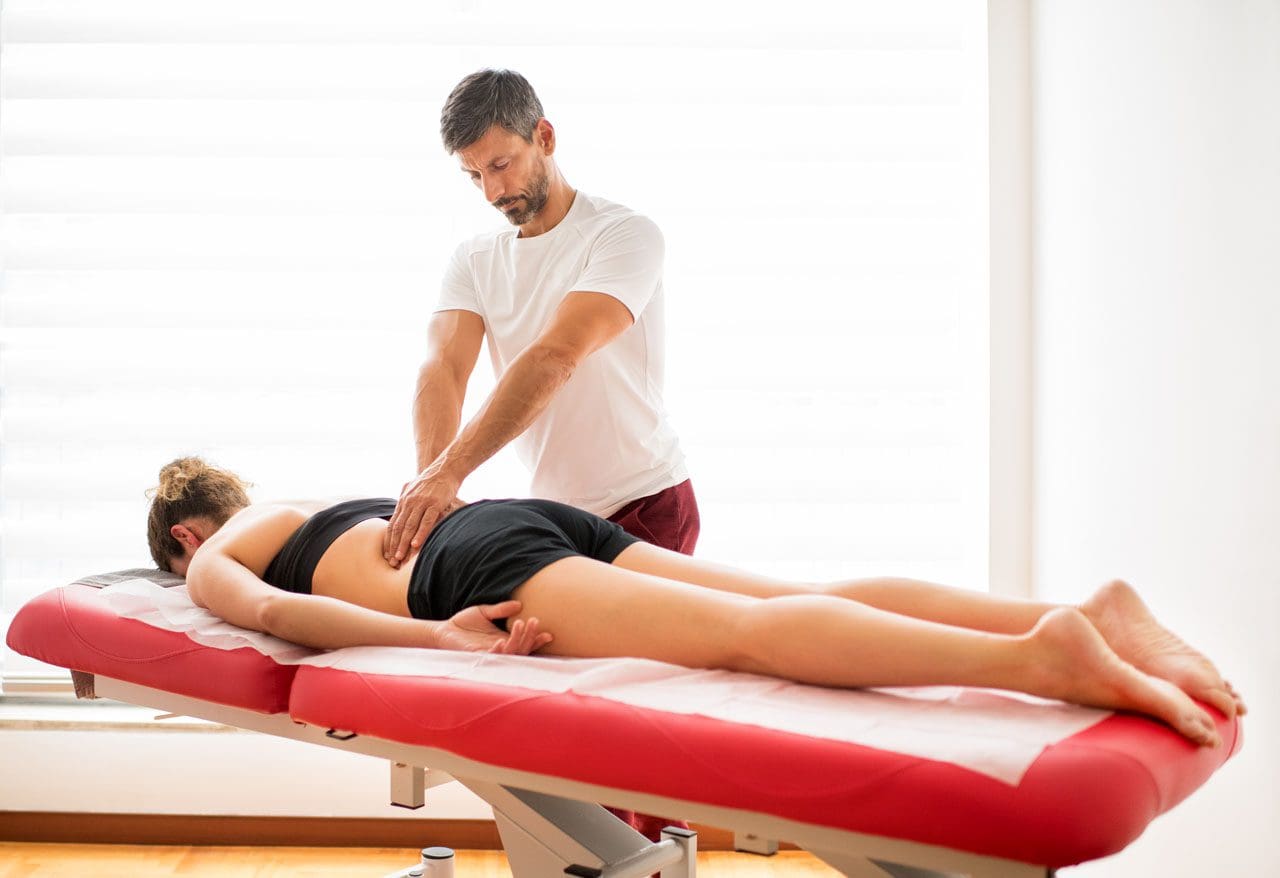
If the spine is out of alignment it could contribute and exacerbate the carpal tunnel. Chiropractic utilizes spinal manipulation to realign the spine to its correct position. These adjustments are performed by hand, but special devices, instruments, tools, rollers, etc, could be used during the treatments. A chiropractor will make adjustments to the arm and wrist, as well. �
� Ultrasound
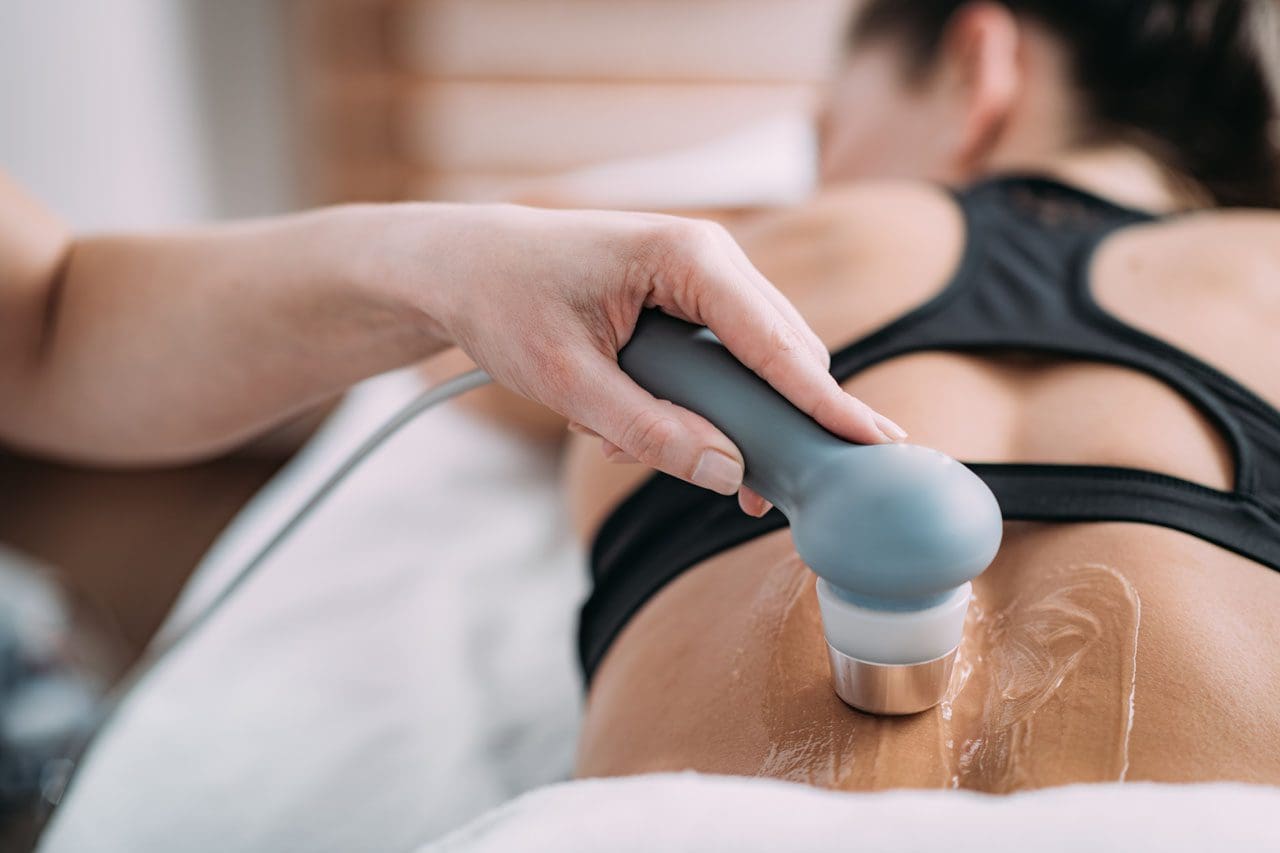
Ultrasound uses low energy sound or high energy sound. The sound waves are highly focused and penetrate the body�s tissue at a very deep level. These waves are quite effective in reducing inflammation, alleviating pain, and relaxing the muscles. It could be used as a stand-alone treatment or along with chiropractic treatment. �
�
Wrist Supports
Wrist supports are used to keep the wrist properly aligned with the rest of the arm to reduce pressure and compression. It can be used as a preventative measure against carpal tunnel. A chiropractor could go with this option if the individual does repetitive work that could contribute to the condition. �
�
This is usually done in conjunction with regular chiropractic care. When treating carpal tunnel, a chiropractor could suggest certain therapeutic exercises and a dietary change to help promote optimal wellness. This is to help the individual get the most benefits from the treatment and to help prevent the condition from worsening, as well as, other conditions. �
�
Posture
Proper posture is essential for optimal health, well being, can help avoid age-related conditions and allows the organs room to operate properly and efficiently. Posture can be affected in different ways. Sustaining an injury is one in which the body compensates by listing to one side or hunching over to relieve the pain.
Another reason is slouching. Those of us that just don�t stand and sit up straight through bad habits, lack of exercise, improper diet, medication, and the list goes on and on. Whatever the reason, poor posture will gradually lead to:
Back pain
Headaches
Increased risk of injury
Decreased flexibility
Decreased mobility
It can cause the body to age quicker. However, in most cases, even those with extremely poor posture can find help and return to a high quality of life. Chiropractic has shown to help many regain a straight, healthy posture.
�
Postural Conditions
There are postural conditions that chiropractic is very helpful in alleviating, include:
Forward head posture – usually associated with mobile devices
Kyphosis
Scoliosis
�
Treatment
A chiropractor will:
Discuss the problem/s you are experiencing
Listen to the complaints
Find out when the problem started
Go through events or work that could have contributed to the problem
Thoroughly evaluate the medical history
Observe the way you sit, walk, bend, and movearound
A chiropractor will request x-rays and assess the alignment of the spine. If necessary a neurological or orthopedic test could be done to ensure that there is no underlying condition or injury that is causing the problem.
They will ask you to stand straight and possibly take measurements to determine if there is any visible deviation from the optimum posture. They will then ask you to move and bend while they test the range of motion, mobility, flexibility along with muscle strength and length. �
�
Posture Plan
Once the assessments are complete the chiropractor will discuss the best treatment option available. They will walk you through the adjustments that will be performed along with other therapies they might recommend. The best course of action to relieve any pain will be discussed, as well as get your spine into proper alignment improving posture. They will also talk to you about stretching exercises and things to do at home. They could also discuss:
Sleep positions
Diet
Work area adjustments
Exercise
Weight loss
Chiropractic focuses on whole-body treatment. This means addressing lifestyle changes and getting the individual into optimal shape. Basic chiropractic adjustments can help improve posture within a few sessions.
After the body is in alignment you will feel more energetic, healthier, and happier. The body is an intricate machine and when one part is out of order it begins to affect all the other parts. Chiropractic can improve overall health and wellness. We want to get your body functioning more effectively and efficiently and feeling better.
�
Chiropractic Podcasting: Why Chiropractic Works
Dr. Alex Jimenez�s Blog Post Disclaimer
The scope of our information is limited to chiropractic, musculoskeletal, physical medicines, wellness, and sensitive health issues and/or functional medicine articles, topics, and discussions. We use functional health & wellness protocols to treat and support care for injuries or disorders of the musculoskeletal system. Our posts, topics, subjects, and insights cover clinical matters, issues, and topics that relate and support directly or indirectly our clinical scope of practice.*
Our office has made a reasonable attempt to provide supportive citations and has identified the relevant research study or studies supporting our posts. We also make copies of supporting research studies available to the board and or the public upon request. We understand that we cover matters that require an additional explanation as to how it may assist in a particular care plan or treatment protocol; therefore, to further discuss the subject matter above, please feel free to ask Dr. Alex Jimenez or contact us at 915-850-0900. The provider(s) Licensed in Texas& New Mexico*
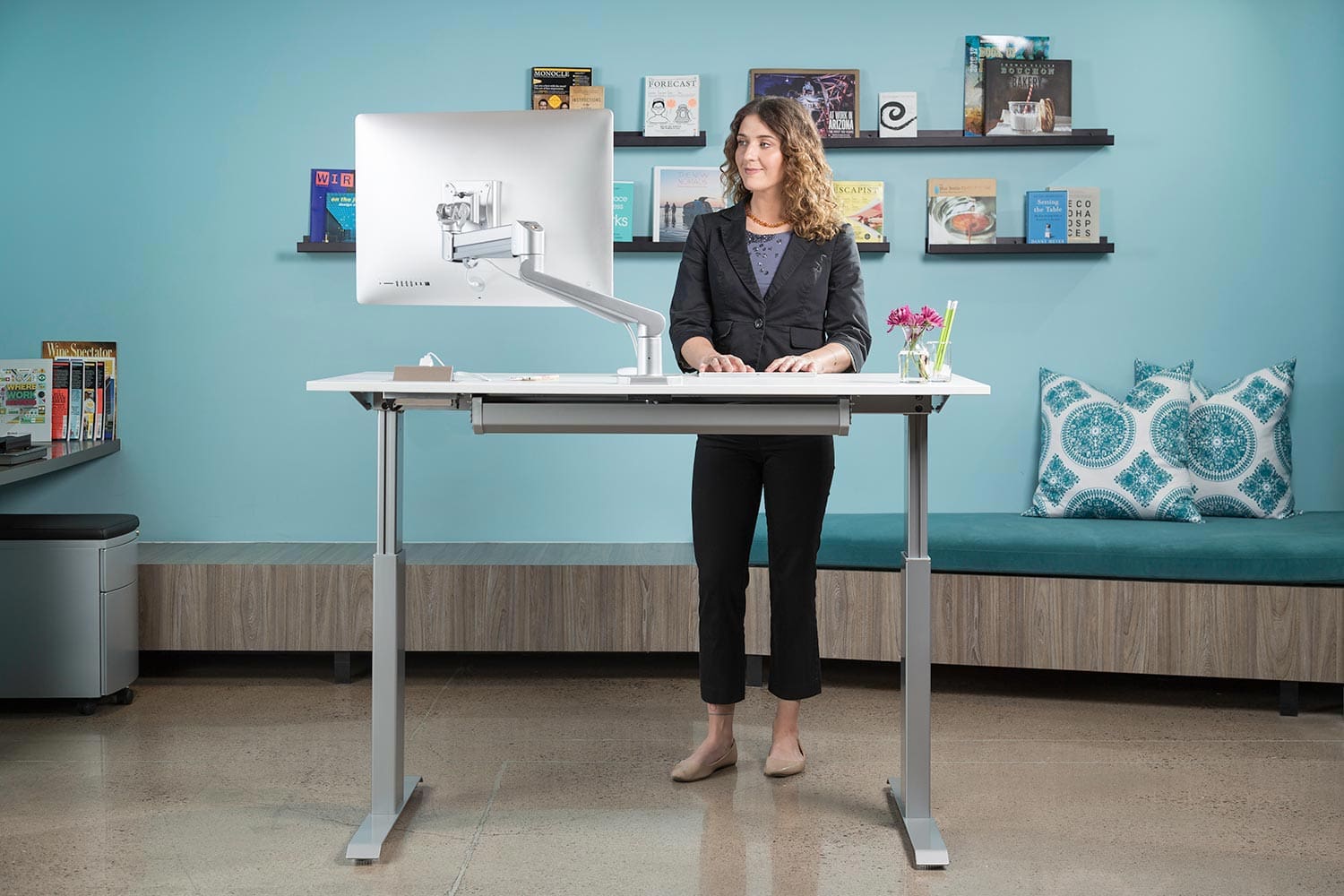
Sit-stand desks are coming around, especially with so many of us working from home. Sitting is not a bad thing, it is just that we do it too much. Whether at home or work, too much-sitting causes health problems, and musculoskeletal problems, which can lead to a chronic back pain condition.
Too much sitting has been compared to smoking, and sitting in front of a computer for hours and hours has led to 85% of workers reporting discomfort/pain/ health issues at work. Fortunately, there is hope for the modern-day office known as the sit-stand desk or a standing office desk. Individuals are rapidly discovering the benefits of this ergonomic tool. �
�
�
� Sit-stand desks encourage workers not to sit as much and stand for a while. This generates a spectrum of spine health benefits that range from reducing pressure on the back to burning a few extra calories just from changing positions. Thinking of investing in an adjustable desk, here are some key things to consider.
�
Get a new sit-stand desk or a unit that sits on top of my desk
This depends on the amount of space that is available. If there is plenty of space, specifically, to spread things out over a large desk area, then it can make sense to invest in a stand-alone sit-stand desk. If the current desk is right for you, then a sit-stand desk put on top of the current desk may be the better option.
�
Height Adjustment
It�s important that the height of the desk can be adjusted. This has to do with different heights for different work tasks. For example, an individual could prefer one height for writing and another height when working/keyboarding on the computer.
If the desk is going to be used by others, then it�s essential that the height can be adjusted to meet the needs of those with different heights and work preferences. The Business and Institutional Furniture Manufacturers Association recommends that the height range be 22.6? to 48.7?. Ultimately the range depends on those using the desk. �
Depth of the desk
Depth is the front-to-back tabletop distance when facing the desk. A good choice is a desk that has a minimum depth of 30?. This allows those who prefer more desk space the ability to spread out the work. However, smaller depths are available.
�
Weight capacity
Sit-stand desks are built to handle the weight of the usual desktop items:
Computer
Monitor/s
Keyboard
Mouse
Speakers
Phone
With heavy items, it’s best to review the weight restrictions of the desk you will be using. Weight restrictions vary, but there are all kinds of desk models to fit your needs. �
�
Desk budget
This depends on your budget, work purposes, and quality. Sit-stand desks can be found in a wide range of prices. Opting for the cheapest desk is not the wisest thing to do. Remember these desks are an investment in the spine and overall health. Consider the quality of the desk and how long it will last along with a warranty to protect you if the desk malfunctions.
�
What to look for
Sit-stand desks come with all kinds of options, in terms of quality and convenience.
�
Noise level:
If a quiet work environment is important, then look into desks that offer a quiet action/transition when switching from sitting to standing and vice versa.
�
Speed:
Some desks can take a long time to switch. Be careful with these because the use of the full functionality can diminish because of the length of time it takes. Look for the quick adjustment type.
�
Manual vs. electrical:
There are some desk models that operate using hand cranks, locking switches, etc. while others use electric/pneumatic lifts to raise and lower the desk with a power button. The method of movement chosen will have a distinct impact on the ease of use, speed, and noise level.
�
Programmable:
Some desks can be programmed with height preferences so they can be set to the desired position and saved.
�
Customization:
If the desk needs to be able to function around privacy screens or specialized office equipment, a one-size-fits-all desk may not be the best option. This is something to consider if the desk needs to fit perfectly in an established environment. �
Keeping the desk in the standing position
Some individuals may feel better standing all day. However, standing for long periods does as much damage to the spine as sitting all day. The best approach is to vary postures over a workday.
After sitting for an hour, get up and move around.
If you�ve been standing for a while, take a break and sit.
That is what sit-stand desks are made for. They are made to promote changing positions throughout the day, which is the best thing for the spine. Be prepared for a transition period. Standing at work can bring some unexpected fatigue if you’re used to sitting all day.
Getting into the flow of working while sitting then standing, then going back can be a bit daunting. The goal is to slowly build up the amount of time standing, switching to a sitting position, and getting comfortable doing it. Things that can help with the transition are to wear supportive shoes or get custom foot orthotics and use an ergonomic foot mat to make the transition more comfortable.
It will be a short-term adjustment period, but the long-term benefits are well worth it. Employers and employees along with their spines will be very thankful.
Companies are doing what they can to keep operations moving and workers employed. Those that are able to work-from-home are doing so. But working from home is new to many and creates new challenges of converting an area in the house, apartment, etc, to become the workspace.
Back pain is common whether at the office or at the house. Everyday activities like the way you sit or lift can cause back pain if you�re not careful. At the house, it can be easy to lose track of time working. However, sitting with the wrong chair, at an improper height is not great for the body and overall health.
Working from Home and Back Pain
You probably thought you�d be comfortable working while lounging in bed or slouching on the sofa. However, after a few hours,�you would have a sore back, neck, or shoulders muscles. Working on a laptop for hours daily�at the kitchen counter or hunched over a coffee table and not sitting at a table or desk with a proper chair can lead to pain.�The best way to reduce and avoid back/neck pain is to make a few changes to the workstation.
Setting Up The Workspace
A comfortable workspace will increase productivity and physically help you feel good.
Working comfortably for hours, maintaining proper posture, it would be wise to invest in practical office appliances that can support physical well-being. Proper office ergonomics include:
The correct chair height
Footrest
Working desk posture that keeps muscles and joints comfortable
Choosing the ergonomic office chair is important, considering you will be using it for back support. Office chairs are not a one size fits all. The choice could be the difference between having continuing back pain or improving comfort, health, and overall productivity.
Ergonomic Back Support
Despite the adjustable ergonomic chair, you might still have back pain while working. Consider the following because it might not be the chair that�s not working.
Keep Moving Around
Step counts could take a dive when working from home. Exercise and stretching at regular intervals are extremely important to protecting the spine throughout the day. Remembering to do this at home can be harder than working in an office environment. Use an automatic reminder on the phone. Our bodies need regular low-impact aerobic activity. It provides the tissues with vital blood flow and helps minimize back pain.
Be Sure To Check Your Posture
The spine is not fixed in abnormal positions. Sitting and slouching forward for a long time will contribute to back pain. The advantages of sitting straight:
Keeps the Joints Aligned
Keeps the Bones Aligned
Supports the Muscles
Supports the Ligaments
Prevents Muscle Fatigue
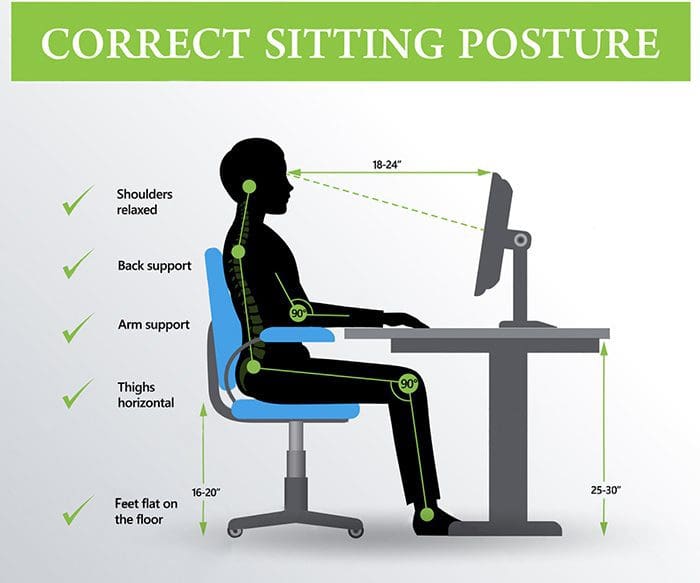
Sit all the way back in your chair and take full advantage of the lower back support. The knees should be bent at a 90-degree angle with the feet flat on the floor or on a footrest.
Proper Screen Height
The height of the computer screen should not be too high or too low. Your eyes should aim at the center of the screen without having to crane your neck up or down. It should be directly in front to avoid tilting or turning your head. A laptop should be raised anywhere from 5 to 10 inches to provide the proper height.
Speaker Setting
Don’t go for the multitask when it comes to the phone. Having the phone between your neck/shoulder and working at the same time can lead to stressing your back and hurting/injuring the muscles. Turn on the speaker or use a headset to avoid the awkward neck position.
Breathe Deep
Proper breathing keeps the body and the muscles in the mid and lower back nicely relaxed. Improper breathing can make the nervous system react, causing pain or discomfort. Breathing exercises can be a way to target lower back pain/s. No special equipment is needed and can be done anywhere, anytime. Concentration is the key. Inhale and bring the navel towards the spine and then exhale. This exercise will engage the core muscles and will support the upper body.
While we have this time at home, working, teaching, we might be realizing that the chairs we are using are great for kicking back or sitting only for a short while. It could be time for a proper office chair with back support for those with back pain, as well as to help prevent poor posture conditions that can generate back pain.
Here are a few of the top picks for back pain. Experts offer guidance on how to purchase an ergonomic office chair. Author of the book Wellness by Design�is a consumer guide to optimizing your home for physical and mental health. Hopefully, this will aid you as you navigate chairs for back pain.
Posture Importance
One way proper posture is gained is by walking with a book on your head. That won’t be necessary, as good office chairs that offer back support lend themselves to healthy posture, which helps back pain. Studies confirm that improved ergonomics greatly decreases back pain. Proper posture keeps your body positioned to minimize stress on the muscles, joints, ligaments. Sitting the wrong way for a long time drains you and can cause fatigue, back pain or aching neck after a long day.
What to Look For
When it comes to chairs for back pain you want the best ergonomic office chair for your home. Keep an eye out for these key elements.
Adjustable
This is important, as our bodies are all different and require different settings for optimal posture. A chair should have adjustments for the seat, arms and back. The more adjustability the chair offers in terms of height and angle, the more it can be customized to your body.
Rolls Easy
A chair that rolls easily is one essential component for back pain support and prevention. Easily rolling allows you to stay close to your work, move around the work area comfortably, and optimal visibility. Be sure the construction of the casters is heavy-duty and that it will roll on your floor’s surfaces.
Durability
Durability goes a long way. Established brands with a reputation for high quality shows their confidence in the chair�s ability to serve you long-term. It might be a bit expensive but it�s an investment in health and productivity. The United States Department of Labor offers a how-to guide to create the best ergonomics set up for you. Their guide includes the backrest, seat, armrests and the chair base. Chairs for back pain are focused on the overall comfort of the individual.
The right chair helps position your body so that you don’t activate trigger points and lets you roll smoothly so that you�re consistently working in a more ergonomic fashion.
Best Budget
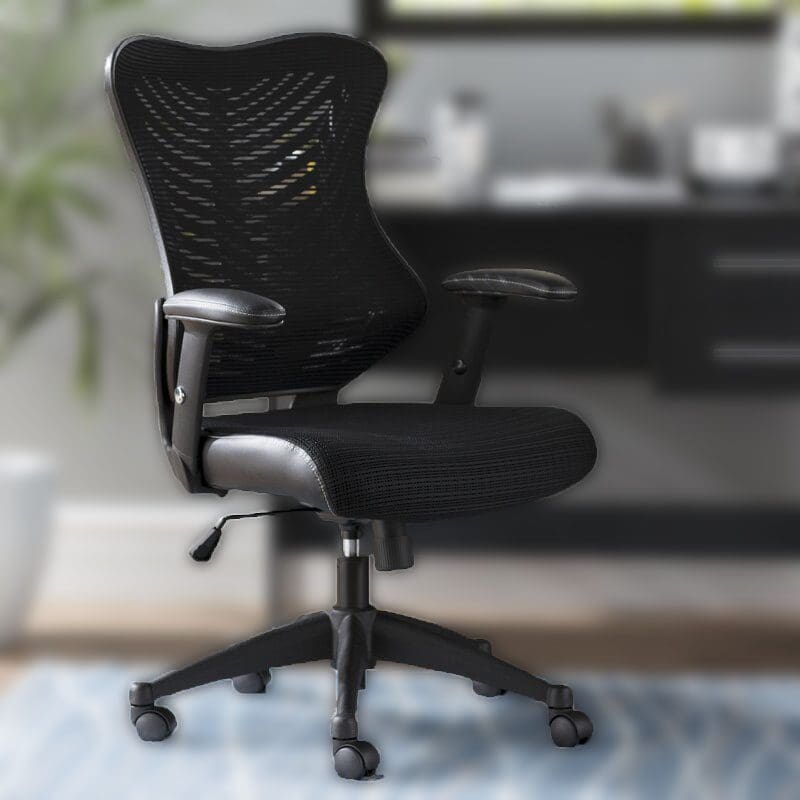
The best chair for a budget was the Zipcode Design Bret Ergonomic Mesh Task Chair, which runs about $159.99 depending on where you shop. This office chair checks off many ergonomic guidelines set by the Department of Labor and is price friendly. The chair has a five-legged sturdy�base, casters that move easily and a backrest that follows the natural curve of the spine.
Best Mid-Range
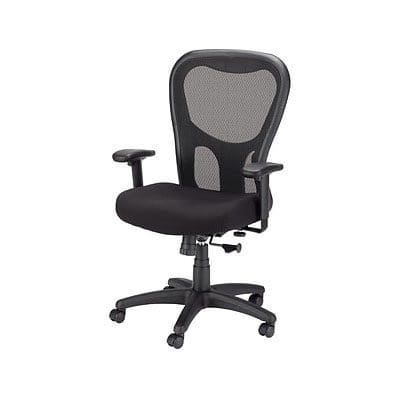
The best mid-range model is the Tempur-Pedic TP9000 Mesh Task Chair, $318.99. The Tempur-Pedic company that makes mattresses have created an office chair that helps the body. It is created with memory foam has straightforward levers that allow you to adjust the armrests and seat easily. Easy-to-clean material is another benefit when working from home.
Best High-end Option
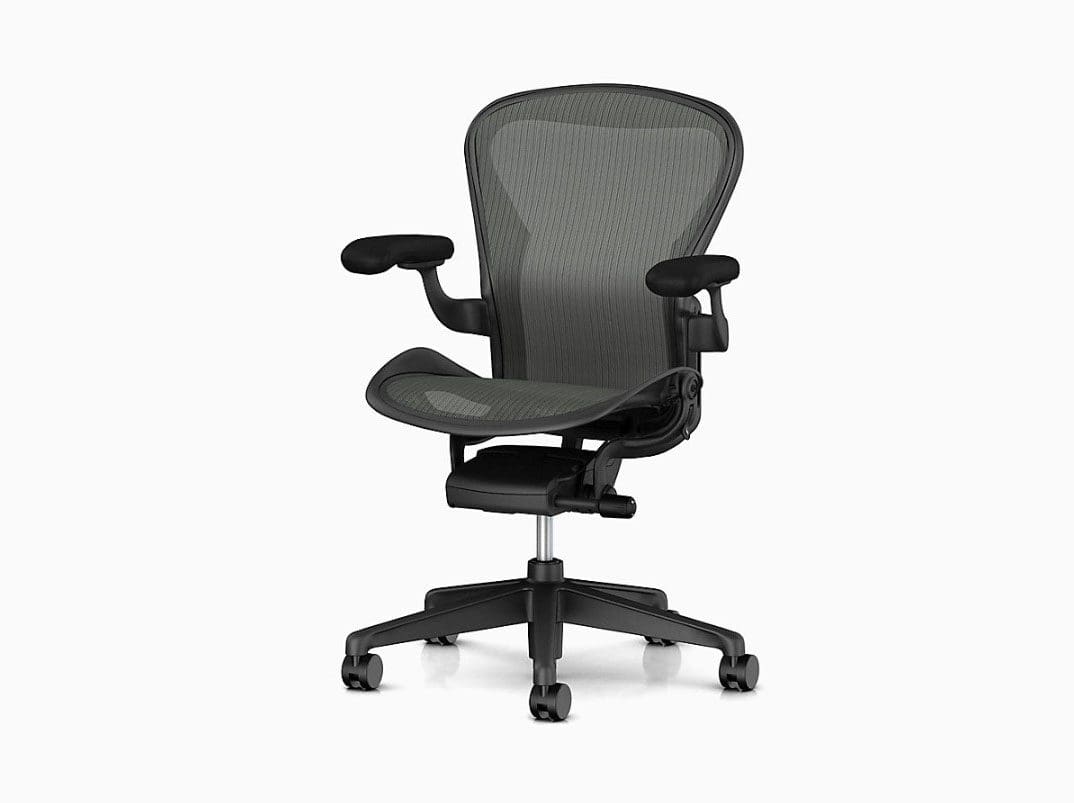
The best high-end model is the Herman Miller Aeron Chair, $1,395. This one is priced pretty high because of its plush ergonomic features. Think of chairs for back pain as an investment for your health and high quality of life. This is a cult-favorite chair that was designed 20 years ago and has sold over 7 million. It is completely customizable, from the chair size, level of back support, preferred tilt and seat angle, custom armrests and custom casters made for your floor type.
Honorable Mention
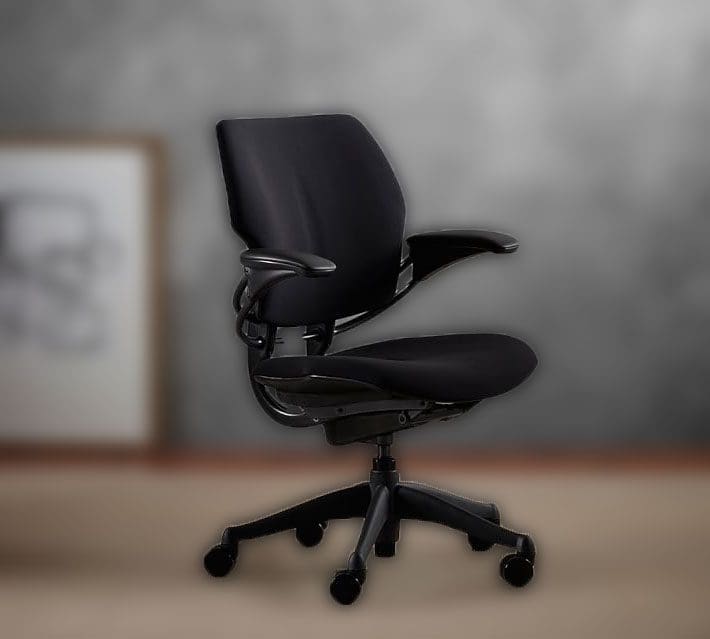
An honorable mention is the Humanscale� Freedom Task Swivel Desk Chair, $1,049.
This is a sleek cutting-edge office chair for back pain. The seat relies on body weight and physics for its ergonomic superiority and checks off the Department of Labor�s recommendations for optimal office chairs. It has adjustable arms, independent-adjustable seat and more.
As we have transitioned to the spring season, especially with everything going on, most of us are taking on a DIY project or two along with spring cleaning around the house. You definitely want to avoid back pain and for sure back injury at any cost. The aim is to balance spring cleaning and spine safety while performing out-of-the-ordinary chores. Here is a little what to do’s and don’ts.
Spring Cleaning
What to do
Stand up straight and learn to practice proper posture. Stand in a way where your back is less prone to injury.
No matter what task you are performing, keep your spine in line and constantly check on how you’re standing, reaching and lifting.
Lift with your legs, not with your back. Avoid bending at the waist and straightening out, this is a bad habit and could be a set up for injury. You could slip a disc, tear a muscle, or sustain other injuries to the spine. No matter what you’re lifting, bend your knees and keep your back straight to avoid injury.
Maintain healthy body weight. While cleaning up the house, consider cleaning out the pantry and refrigerator. Carrying too much weight puts added and possibly dangerous pressure on the spine. This could mean that the added weight pulls your spine in all directions because of weak back/core muscles trying to keep the structure in line. Losing excess weight can help ease tension on the back and improve overall health.�
Strengthen the core muscles. Incorporatecore-strengthening exercises into your day. With strong abdominal and back muscles, the core supports your spine, keeping it aligned and healthy.
Get plenty of calcium-rich foods, like low-fat milk and cheese, almonds, black beans, and broccoli. Give your refrigerator a makeover with better foods for spine health. The spine needs healthy muscles to support it. Strong bones mean less risk of a spinal fracture if you suffer a slip and fall accident.
What not to do
Clear the air and stop smoking. Not only is smoking bad for the heart and lungs, but it is also bad for the spine. Nicotine decreases the discs ability to absorb nutrients to maintain the spine’s proper function. Weakening the vertebrae increases the risk of a herniated disc or other spine injury/s. Nicotine interferes with the healing process, meaning that recovery time is slower.
Over exert yourself. Taking on too much or trying to power through without proper breaks can lead to injury, as well as other health problems.
Over-reaching. Trying to clean that out of reach spot overstrains your back, and can definitely lead to injury/strain/sprain.
Use improper equipment. Using the wrong equipment/tool can be dangerous and raises the chance of injury.
Don’t take on large projects without warming up and stretching. When the body’s spine muscles are not used to certain physical activities they can spasm and lead to sprain/strain and back pain.
Don’t put your body in awkward positions when cleaning, etc. Change your posture frequently to keep all the spinal muscles moving and active. If an awkward position presents, stop and find a comfortable position to work from, ensuring spine safety.
Back Pain
All of these words can be used to describe back pain.
Achy
Dull
Excruciating
Sharp
Throbbing
Back pain is a common occurrence and when spring cleaning, if not using proper form and making wise decisions it can exacerbate the pain or create new injuries. The American Chiropractic Association says that back pain is the single leading cause of disability worldwide.
Treatment�
Back pain usually heals on its own. A few days of over-the-counter pain meds, ice, and rest bring the back/spine to normal.�For those that have to deal with the pain after a few weeks’ might want to opt for other solutions. This is true for individuals who experience repeated flare-ups, or chronic lower back pain.�One of the best options is chiropractic.
Chiropractic doesn’t focus only on the symptoms but helps kick in the body’s natural healing abilities. Chiropractors understand the:
Bones
Muscles
Discs
Nerves
They are able to determine the reason for the pain. Once diagnosed they can create a customized treatment plan that can range from compresses, spinal manipulation and exercises that helps heal the area and reduce the pain.
Medication-free solution
The natural healing, restorative approach that chiropractic treatment offers instead of pain meds, which just dull the pain is one of the primary reasons individuals flock to chiropractic. Each individual’s treatment varies according to Spine-Universe. As treatment progresses spinal alignment begins to balance the rest of the body and helps correct the issue causing the pain. Spinal manipulation improves mobility and function.
Chiropractic for back pain
Patients who experience lower back pain obviously never want to deal with it again, but�it can flare up periodically. According to the National Institute of Neurological Disorders and Stroke, roughly 20% of those who suffer from low back pain will eventually deal with it chronically. This can cause frustration, especially when it affects mobility.
Those who choose chiropractic are privy to treatment that:
Reduces pain
Increases healing
Shortens downtime
Lessens chances of recurrence
If over the counter medication and ice packs haven’t worked, it could be time to make an appointment with a licensed chiropractor. Spring is a great time to introduce yourself to new activities to keep you and your family busy and healthy. With some preparation and attention to detail spring cleaning can be productive and safe.
As you teach healthy ergonomics, remember these neutral posture guidelines apply to children but can also benefit adults.�The main focus is to always work in a neutral posture. Following these guidelines will ensure your child uses a computer in a comfortable and ergonomically correct fashion.
Neutral Posture
Healthy upper body posture means the shoulders are back, relaxed and not slumped/slumping forward over the keyboard.
The back/spine should be at a 90� degree angle supported by a chair with proper back support.
The knees�should not compress the chair seat. If they do adjust the seat to go back enough for the knees to be free.
The knees should be at a 90� degree angle behind the knees and should be open.
Don’t sit with legs and feet tucked under the chair.
The feet should be firmly flat on a stable surface ensuring proper support on the floor or a footrest.
The head should stay balanced and not tilted back or too far forward.
The upper arms should be close to the body and relaxed.
The elbows should be at a 90� degree angle and the forearm horizontal.
The wrist should remain in a neutral position.
Let your child use the computer for a little while then adjust their posture and the workstation if needed, so they are working in the most neutral posture. Find ways to help them remind themselves of their posture and to take frequent breaks to stretch out and move around.
Create/Organize a Normal Workstation
The work area should be a space that is easily accessible by a child while they can sit comfortably/properly without having to bend awkwardly or overly twist to reach for something.
Keep the items that are used the most�while working at the computer within arms reach.
If your child needs to type and use a text document or book for reference, make sure there is a document holder/stand that is next or as near to the screen as possible so that they don’t have to turn or twist their head over and over or in a strenuous fashion. You want them to use their eyes with minimal head movement other than to look away for an eye break, a quick neck stretch and repositioning to stay comfortable.
Check the Screen Position
The computer screen should be positioned to be able to comfortably view the screen without having to tilt their neck backward or forwards.
Too high, the child’s neck will tilt back, and too low means it will be bent forward.
Adjust the height and angle to avoid these incorrect postures.
Workstation Equipment
Ergonomic furniture and equipment can help create a comfortable and adjustable workstation for your child as they grow.
An ergonomic chair with height adjustment, adjustable/comfortable seat and proper lumbar back support.
Make sure they work on a stable and sturdy desk with a flat work surface so that your child works in a neutral posture.
An ergonomically tilted keyboard system or a height-adjustable keyboard and mouse platform can help keep the forearms and wrists in a neutral posture.
The fit of the keyboard and mouse should be comfortable in your child’s hands.
If they have small hands, then consider a smaller keyboard and mouse if necessary.
Screen Glare
Check the computer screen for glare areas/bright spots. This could affect the eyes and cause the child to start moving their head/neck around too much and in the wrong way that would create a crick or strain.
Adjust/reposition the screen to get the correct angle for the proper posture or adjust the room’s lighting.
Proper lighting is a must for reading and protecting the eyes.
Make sure they take frequent eye breaks and look away at something other than a screen like a piece of furniture or out a window and that is farther away to readjust the eyes.
Computer Time Management
Posture problems associated with computer use vary on the length of time that your child uses the computer, takes rest breaks and does other tasks/chores to keep them moving/stretching out and not staying seated or in one position for too long.
Regulating computer time use is important and can be done just watching the clock and saying when is when or use an app to set the time on and off. These apps give screen alerts and tell when to take a break and provide simple stretching exercises.
As part of our Acute Injury Treatment & Rehabilitation Practice, we are presently offering detailed�Institute For Functional Medicine��Collaborative Assessment Programs focused on Integrative Treatment Protocols. We completely evaluate personal history, current nutrition, activity behaviors, environmental exposures to toxic elements, psychological and emotional factors, in tandem with your genetics.
Our purpose with these high-level assessments is to understand the root cause of chronic disorders and to treat the person holistically.� Integrative Personalized Medicine is the future of healthcare and we are very proud to bring it to all our patients.� Our online�Functional Medicine Health Assessment Questionnaire has given insights into our patients’ present Functional Health.
Correct your Bad Posture with *FOOT ORTHOTICS* | El Paso, Tx
NCBI Resources
Because we spend so much time�in a chair we need to have the right one that will protect our spines.�Think of the�chair as a piece of�work�equipment to optimize productivity.�Ergonomics utilized to the fullest means less back pain and better focus.
Back/spine injuries now rank either second or third overall for workplace injury/s. According to the Bureau of Labor Statistics, every year there are over 900,000 cases of back injuries that account for 1 in 4 non-fatal job-related injuries that involve work days missed.�
Backcare & Standing Work
Back injuries can be painful, debilitating, and life-changing. 8 out of 10 people will experience a back/spine injury that can lead to chronic pain and health conditions. We all need to know, especially those of us that work standing up is firsthand knowledge of how important it is learning how to improve spine health and take steps to prevent back injury.
In order to prevent low back disorders means that there needs to be an understanding�of the spine when working along with knowledge of back injury risk factors.
Back/Spine Basics
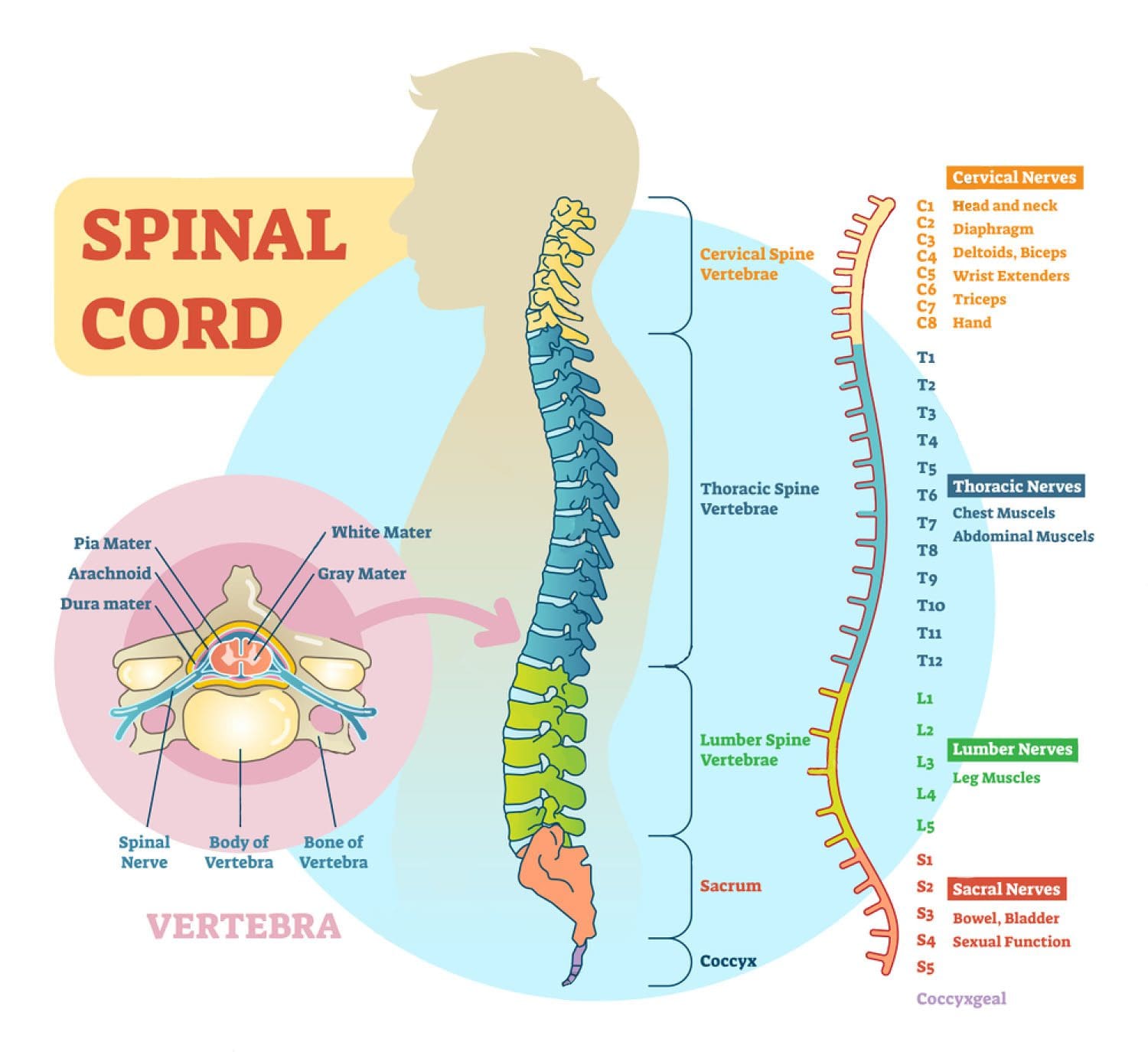
The spine is a flexible structure that consists of 24 bones that move, shift, and contort, called vertebrae. There are:
7 in the neck
12 in the chest
5 in the low back
These are connected by ligaments and separated by pads of cartilage, called intervertebral discs. These are the shock absorbers that allow the flexible movement of the spine, specifically at the neck and the low back.
When we stand, the spine naturally curves inwards and outwards. The inward curve is called lordosis, and curves towards the front of the body at the lower back and neck area. The outward curve is called kyphosis, and curves towards the back of the body around the chest area. When we bend over the vertebrae of the lower back change position and shift from being in lordosis to kyphosis when completely bent over and then back again when upright. With this information, it is easy to see how much we move around, bend, stretch and reach during a regular day. The lower back gets used the most, which is why low back pain and injury/s and disorders are the most common.
The National Institute of Occupational Safety and Health concluded: �muscle strain is the most common type of work or nonwork back pain� (Bernard, 1997). This is good news for chiropractors and ergonomists because it means that we can find ways to reduce/change the way we work and the effort involved to minimize injury risks.
Keeping the intervertebral discs healthy plays an extremely significant role in preventing back/spine injuries. If these discs get damaged and start to degenerate,�flexibility begins to fade away, stiffness and soreness sets in and the ability to absorb the daily pressure/forces that comes with standing, moving and working.
There is not a normal blood supply to the intervertebral discs. Instead, as the discs change shape when we move around, the nutrients that they need are absorbed into the discs as the waste products are pumped out. This is why moving the body and staying active is very important. Because as you move you are literally feeding your spine and expelling the bad stuff. Intermittently changing postures and positions helps change the force and weight on the discs so that not all one area is taking the brunt of the force. Remember to move around and keep your spine as healthy as possible.
Risk factors
Major risk factors for back injuries include:
Awkward postures
Bending
Twisting�
Heavy physical tasks
Lifting
Forceful movements
Whole-body vibration aka W.B.V.
Static or unmoving work postures
These risks can happen separately or could be a combination of them all, and if these risks are taking place at any one time the higher probability of an injury/s.
Standing Work
When we stand, the pressure on the�lower back discs is relatively low. Not that there is pressure but it is much lower than when seated with an unsupported backrest like bleachers for example. Standing up uses 20% more energy than sitting does. When we need to bend down to pick up objects or reach to get overhead objects there is an increase in the forces and pressure on the lower back, and this is when an injury is likely to happen.
Tips to Minimize Injury
Here are some tips to help minimize your risks of back/spine injury when you are doing standing work:
Moving around is important to keep the spine healthy. Moving will help improve circulation and reduce muscle fatigue.
Taking consistent short breaks will help reduce fatigue, discomfort and work other muscles.
Gentle stretching during some of these breaks helps to ease muscle tension and gets circulation pumping.
Pay attention to your posture and the way you stand as you work.
Lean on a solid support to help reduce fatigue when you are standing with a support that you can put your back up against, lean against sideways, lean forwards against and to hold on to will increase safety.
Keep your back strong and try to do exercises that will strengthen the back muscles. Activities, like Yoga, Crossfit, HITT or workouts focused on the spine for flexibility are the way to go.
Maintain a stable posture with your feet on a firm surface.
Avoid twisting the lower back around to reach for things.
Move your feet so that your whole body changes position.
Minimize bending, but when you have to, bend for objects in front of you and bend at the knees instead of the back. When bending for objects that are to the side of you change your stance so you are facing the object, and then bend down at the knees.
Don’t overreach but if you have to reach up to a high area to get something use a step-ladder.
Don’t reach over objects and move the obstruction or change your position before reaching for whatever it is.
Low Back Pain? Fix it with *FOOT ORTHOTICS* | El Paso, Tx
NCBI Resources
The one size fits all method just doesn�t cut it. A more focused approach for every individual leads to better results. Patients find that placing their bodies in certain positions and certain physical activities can:
Activate
Aggravate
Deactivate�their back pain.
Patients also find the pain being either better or worse. Understanding why sitting, standing, and walking can change the severity of low back pain can be helpful in diagnosis. These are important cues that help to diagnose and treat low back pain. People sit, stand, and walk all day. This is why so much research has been conducted on how these specific positions and activities contribute to low back pain.
IFM's Find A Practitioner tool is the largest referral network in Functional Medicine, created to help patients locate Functional Medicine practitioners anywhere in the world. IFM Certified Practitioners are listed first in the search results, given their extensive education in Functional Medicine