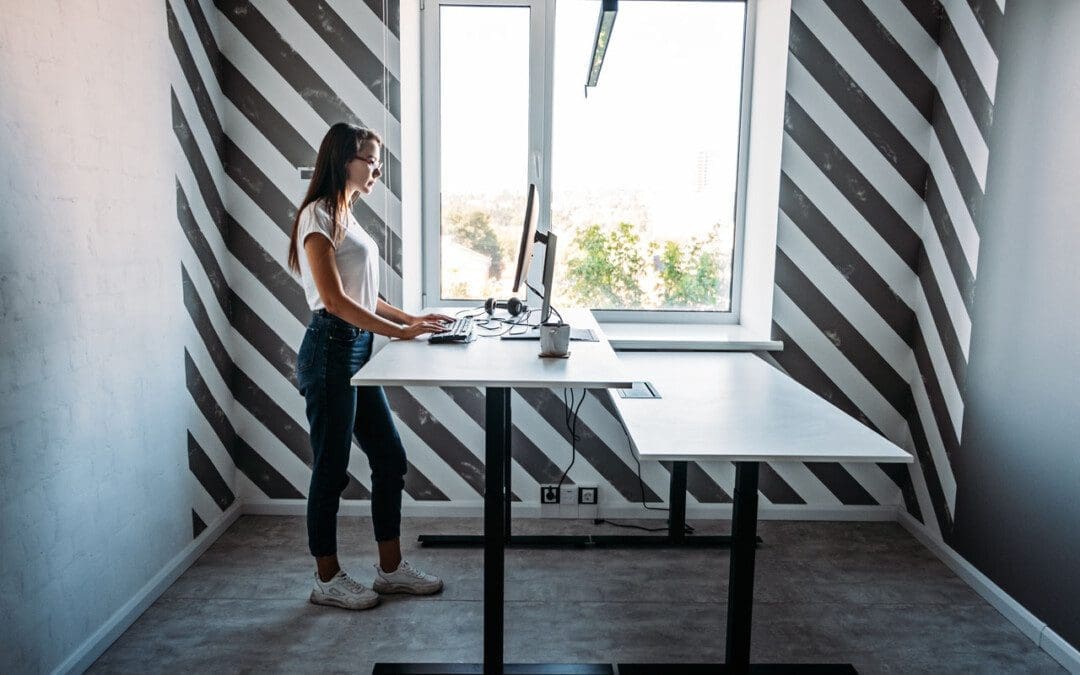
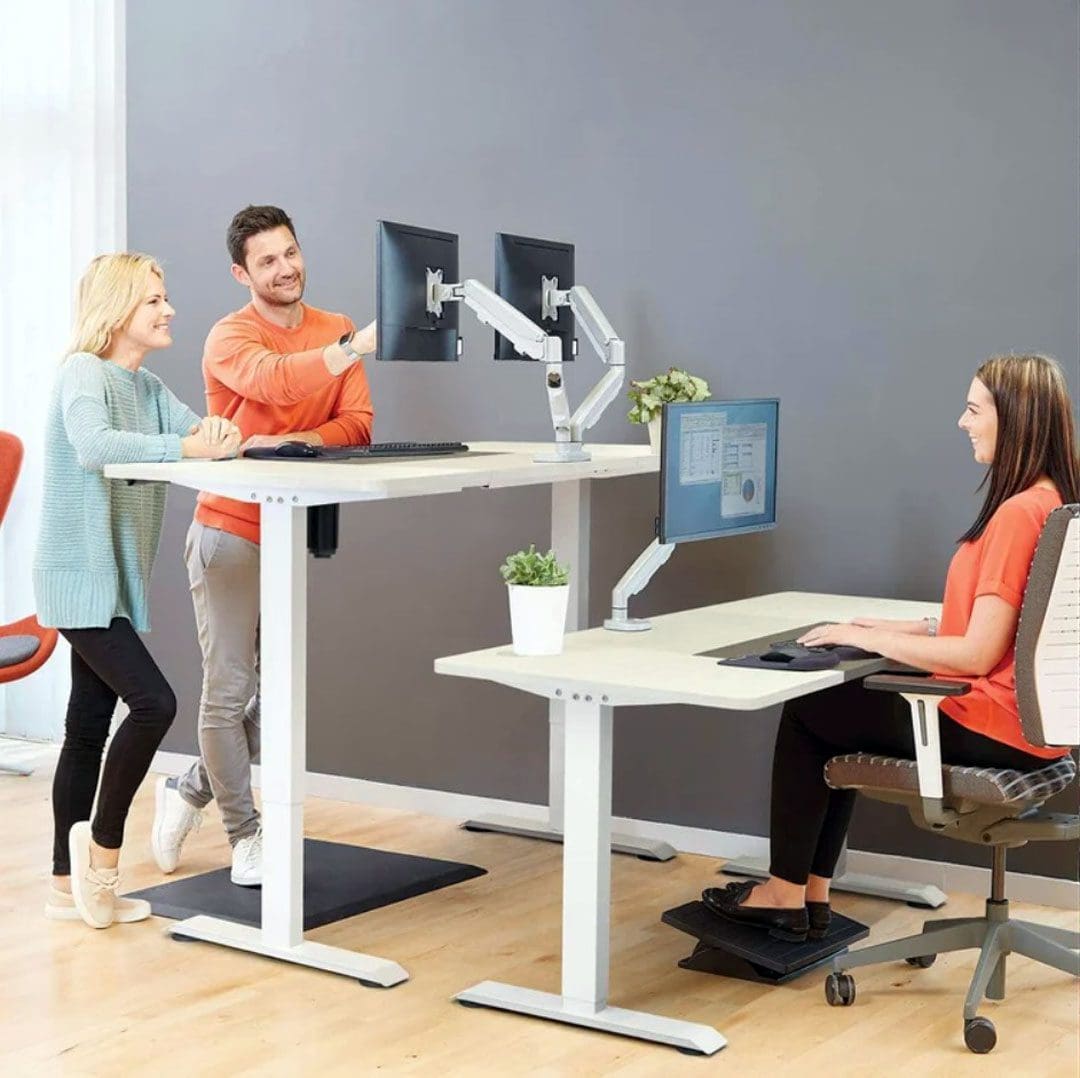
For individuals working at a desk or work station where the majority of the work is done in a sitting position and increases the risk for a variety of health problems, can using a standing desk help prevent musculoskeletal problems and improve short and long-term wellness?
Stand Desks
More than 80% of jobs are done in a seated position. Stand desks have proven to help. (Allene L. Gremaud et al., 2018) An adjustable stand desk is intended to be the standing height of an individual. Some desks can be lowered to use while sitting. These desks can improve:
Blood circulation
Back pain
Energy
Focus
Individuals who are less sedentary may experience decreased depression, anxiety, and risk of chronic disease.
Improve Posture and Decrease Back Pain
Sitting for prolonged periods can cause fatigue and physical discomfort. Back pain symptoms and sensations are common, especially when practicing unhealthy postures, already dealing with existing back problems, or using a non-ergonomic desk set-up. Instead of only sitting or standing for the whole workday, alternating between sitting and standing is far healthier. Practicing sitting and standing regularly reduces body fatigue and lower back discomfort. (Alicia A. Thorp et al., 2014) (Grant T. Ognibene et al., 2016)
Increases Energy Levels
Prolonged sitting correlates with fatigue, reduced energy, and productivity. A sit-stand desk can provide benefits like increased productivity levels. Researchers discovered that sit-stand desks could improve the general health and productivity of office workers. Individuals in the study reported:
According to the CDC, six in 10 individuals in the U.S. have at least one chronic disease, like diabetes, heart disease, stroke, or cancer. Chronic disease is the leading cause of death and disability, as well as a leading force of healthcare costs. (Centers for Disease Control and Prevention. 2023) While further research is needed to see if standing desks can reduce the risk of chronic disease, one study looked to quantify the association between sedentary time and the risk of chronic disease or death. Researchers reported that sedentariness for prolonged periods was independently associated with negative health outcomes regardless of physical activity. (Aviroop Biswas et al., 2015)
Improved Mental Focus
Sitting for extended periods slows down blood circulation. This decreased blood flow to the brain lowers cognitive function and increases the risk of neurodegenerative conditions. One study confirmed that healthy individuals who worked in a prolonged sitting position had reduced brain blood flow. The study found that frequent, short walks could help prevent this. (Sophie E. Carter et al., 2018) Standing increases blood and oxygen circulation. This improves cognitive function, which also helps improve focus and concentration.
Depression and Anxiety Reduction
Modern lifestyles typically contain large amounts of sedentary behavior.
However, there is a small amount about the mental health risks of prolonged sedentary behavior. There have been a few studies aimed at improving public understanding. One study focused on a group of older adults, having them self-report sedentary habits that included television, internet, and reading time. This information was compared to their individual scoring on the Centre of Epidemiological Studies Depression scale. (Mark Hamer, Emmanuel Stamatakis. 2014)
The researchers found that certain sedentary behaviors are more harmful to mental health than others.
Television watching, for example, resulted in increased depressive symptoms and decreased cognitive function. (Mark Hamer, Emmanuel Stamatakis. 2014)
Internet use had the opposite effect, decreasing depressive symptoms and increasing cognitive function.
Researchers theorize that the results come from the contrasting environmental and social contexts in which they are happening. (Mark Hamer, Emmanuel Stamatakis. 2014)
Another study looked at the possible correlation between sedentary behavior and anxiety.
Incorporating a standing desk into the workspace can help to reduce the negative effects of sedentary behaviors, leading to improved productivity, improved mental and physical health, and a healthy work environment for individuals who work long hours at a desk or workstation.
Understanding Academic Low Back Pain: Impact and Chiropractic Solutions
References
Gremaud, A. L., Carr, L. J., Simmering, J. E., Evans, N. J., Cremer, J. F., Segre, A. M., Polgreen, L. A., & Polgreen, P. M. (2018). Gamifying Accelerometer Use Increases Physical Activity Levels of Sedentary Office Workers. Journal of the American Heart Association, 7(13), e007735. https://doi.org/10.1161/JAHA.117.007735
Thorp, A. A., Kingwell, B. A., Owen, N., & Dunstan, D. W. (2014). Breaking up workplace sitting time with intermittent standing bouts improves fatigue and musculoskeletal discomfort in overweight/obese office workers. Occupational and environmental medicine, 71(11), 765–771. https://doi.org/10.1136/oemed-2014-102348
Ognibene, G. T., Torres, W., von Eyben, R., & Horst, K. C. (2016). Impact of a Sit-Stand Workstation on Chronic Low Back Pain: Results of a Randomized Trial. Journal of occupational and environmental medicine, 58(3), 287–293. https://doi.org/10.1097/JOM.0000000000000615
Ma, J., Ma, D., Li, Z., & Kim, H. (2021). Effects of a Workplace Sit-Stand Desk Intervention on Health and Productivity. International journal of environmental research and public health, 18(21), 11604. https://doi.org/10.3390/ijerph182111604
Centers for Disease Control and Prevention. Chronic disease.
Biswas, A., Oh, P. I., Faulkner, G. E., Bajaj, R. R., Silver, M. A., Mitchell, M. S., & Alter, D. A. (2015). Sedentary time and its association with risk for disease incidence, mortality, and hospitalization in adults: a systematic review and meta-analysis. Annals of internal medicine, 162(2), 123–132. https://doi.org/10.7326/M14-1651
Carter, S. E., Draijer, R., Holder, S. M., Brown, L., Thijssen, D. H. J., & Hopkins, N. D. (2018). Regular walking breaks prevent the decline in cerebral blood flow associated with prolonged sitting. Journal of applied physiology (Bethesda, Md. : 1985), 125(3), 790–798. https://doi.org/10.1152/japplphysiol.00310.2018
Hamer, M., & Stamatakis, E. (2014). Prospective study of sedentary behavior, risk of depression, and cognitive impairment. Medicine and science in sports and exercise, 46(4), 718–723. https://doi.org/10.1249/MSS.0000000000000156
Teychenne, M., Costigan, S. A., & Parker, K. (2015). The association between sedentary behaviour and risk of anxiety: a systematic review. BMC public health, 15, 513. https://doi.org/10.1186/s12889-015-1843-x
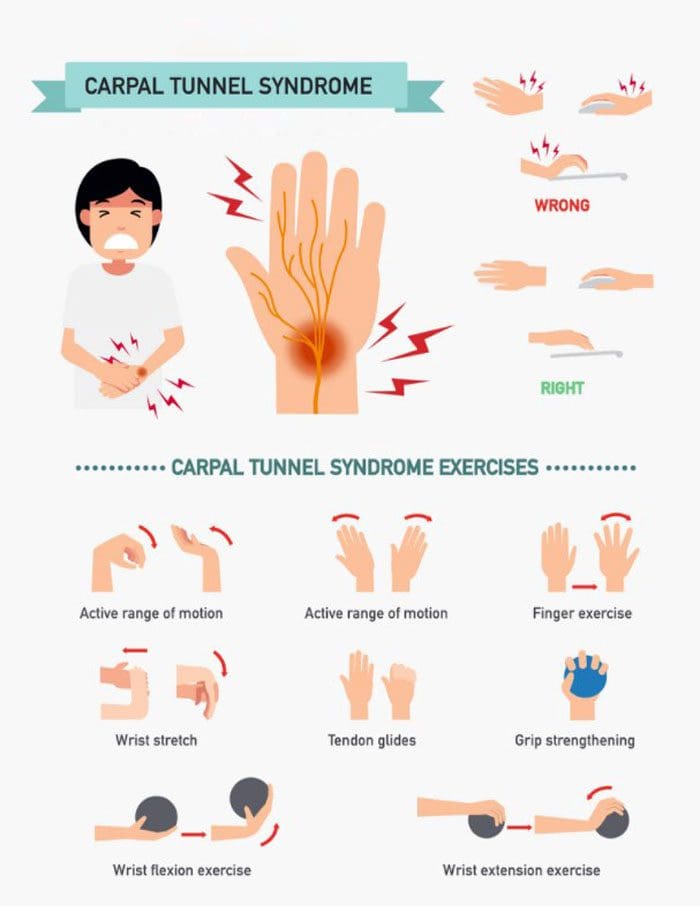
Today, we are constantly tapping, scrolling, clicking, using our hands, fingers, and thumbs on smartphones, tablets, computers, etc. Constant repetitive use has increased the development of carpal tunnel syndrome. If tingling, numbness, soreness, or electrical sensations have begun to develop in the hands, especially the index finger, thumb, or palm, carpal tunnel prevention measures can help before it becomes severe.
Pinched Nerve
Carpal tunnel syndrome is the medical terminology for a pinched nerve. It is the median nerve that passes through the narrow carpal tunnel passageway of ligaments and bones at the base of the hand. This tunnel houses the median nerve and the tendons that allow the fingers to bend. The median nerve generates physical sensation in the index, middle, ring finger, and palm near the thumb. Compression of the nerve or inflammation can cause tingling, numbness, and pain in any and/or all of the hand areas. It can also cause the fingers to bend awkwardly; however, this symptom develops over time. There are so many different causes of carpal tunnel syndrome that it is almost impossible to avoid with the constant overuse/repetition of the hands.
Work – tasks, typing, mouse use, writing, scanning, etc.
School
Injury
Doctors recommended approach for carpal tunnel prevention is to take action at the first sign/symptom. The most effective preventative measures include:
Using a computer mouse – moving, clicking, using the scrolling wheel, etc.
Writing
Cooking – chopping, slicing, mixing, squeezing, etc.
Drawing
Make sure to take frequent breaks from the motion.
Carpal tunnel is more likely to develop if the nerves and muscles are overused for a long time without stopping. When focused on a task, we often don’t realize how the repetitive motions cause strain until a sting or pinch makes us stop. Taking a hand break is essential to give the muscles, tendons, ligaments, and nerves time to relax and stay loose. The break only has to be a few minutes to be effective.
Repetitive Movements and Proper Hand Form/Posture
Repetitive hand or wrist motions in everyday activities sometimes cannot be helped. It is recommended to try to switch hands when performing the task, space it out over the day, take frequent breaks, stretch, and gently shake out the hands throughout the day. Make sure any pressure on the hands or wrists is as light as possible and evenly distributed. Keep the wrists straight or slightly bent and use light tools if possible. Proper posture is crucial for carpal tunnel prevention. Many individuals don’t realize the back, neck, and wrists are intricately connected. Poor posture like hunching over the computer, shoulders rolled forward, and forward neck posture can cause the nerves and muscles of the arm to become compressed, causing tingling, numbing, pain symptoms because they’re not properly aligned. The compression can run down the arms and affect the wrists and hands as well.
Carpal Tunnel Prevention Supportive Accessories
It is also recommended to consider integrating supportive accessories, like ergonomic keyboards, mice, wrist splints, keypad cushions, etc. These tools can support the body and keep the wrists and hands healthy, comfortable, and pain-free. Wrist splints can help by keeping the wrist in a straight, neutral position without thinking about it. This reduces stress on the area and absorbs the pressure of everyday tasks on the carpal tunnel and median nerve. Individuals can also wear the splint at night to support and train the wrist to stay straight throughout the day. Taking action before the symptoms become severe is highly recommended. Talk to a chiropractor or physical therapist for exercises, stretches, and general tips to help with carpal tunnel prevention.
Body Composition
A Snack and A Meal
Without proper planning, the calories an individual consumes from snacks can add up. A recent survey found that snacking contributes 586 calories for men and 421 calories for women per day. Weight loss, weight gain, and weight maintenance come down to calories in vs. calories out.
Eating snacks that are too high in calories or snacking too much can disrupt and derail health goals.
It’s essential to know what a snack consists of, what to look for on a label, and how to plan.
Snacks come in a range of calories, depending on individual goals.
For many, 100-200 calories are recommended for snacks.
Individuals that need increased calories may require a higher calorie snack.
The number of snacks eaten per day depends on individual needs and goals.
It’s best to plan and factor snacks into the overall meal plan to avoid overeating.
LeBlanc, Kim Edward, and Wayne Cestia. “Carpal tunnel syndrome.” American family physician vol. 83,8 (2011): 952-8.
Page, Matthew J et al. “Splinting for carpal tunnel syndrome.” The Cochrane database of systematic reviews vol. 2012,7 CD010003. 11 Jul. 2012, doi:10.1002/14651858.CD010003
Shiri, Rahman, and Kobra Falah-Hassani. “Computer use and carpal tunnel syndrome: A meta-analysis.” Journal of the neurological sciences vol. 349,1-2 (2015): 15-9. doi:10.1016/j.jns.2014.12.037
As you teach healthy ergonomics, remember these neutral posture guidelines apply to children but can also benefit adults.�The main focus is to always work in a neutral posture. Following these guidelines will ensure your child uses a computer in a comfortable and ergonomically correct fashion.
Neutral Posture
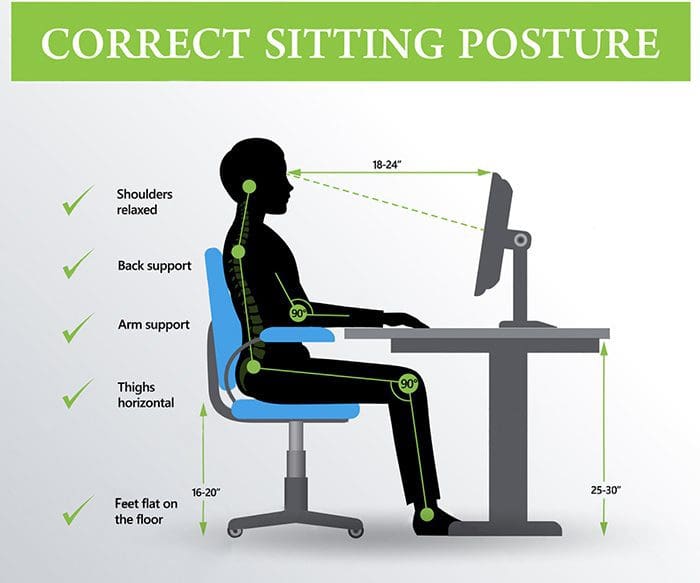
Healthy upper body posture means the shoulders are back, relaxed and not slumped/slumping forward over the keyboard.
The back/spine should be at a 90� degree angle supported by a chair with proper back support.
The knees�should not compress the chair seat. If they do adjust the seat to go back enough for the knees to be free.
The knees should be at a 90� degree angle behind the knees and should be open.
Don’t sit with legs and feet tucked under the chair.
The feet should be firmly flat on a stable surface ensuring proper support on the floor or a footrest.
The head should stay balanced and not tilted back or too far forward.
The upper arms should be close to the body and relaxed.
The elbows should be at a 90� degree angle and the forearm horizontal.
The wrist should remain in a neutral position.
Let your child use the computer for a little while then adjust their posture and the workstation if needed, so they are working in the most neutral posture. Find ways to help them remind themselves of their posture and to take frequent breaks to stretch out and move around.
Create/Organize a Normal Workstation
The work area should be a space that is easily accessible by a child while they can sit comfortably/properly without having to bend awkwardly or overly twist to reach for something.
Keep the items that are used the most�while working at the computer within arms reach.
If your child needs to type and use a text document or book for reference, make sure there is a document holder/stand that is next or as near to the screen as possible so that they don’t have to turn or twist their head over and over or in a strenuous fashion. You want them to use their eyes with minimal head movement other than to look away for an eye break, a quick neck stretch and repositioning to stay comfortable.
Check the Screen Position
The computer screen should be positioned to be able to comfortably view the screen without having to tilt their neck backward or forwards.
Too high, the child’s neck will tilt back, and too low means it will be bent forward.
Adjust the height and angle to avoid these incorrect postures.
Workstation Equipment
Ergonomic furniture and equipment can help create a comfortable and adjustable workstation for your child as they grow.
An ergonomic chair with height adjustment, adjustable/comfortable seat and proper lumbar back support.
Make sure they work on a stable and sturdy desk with a flat work surface so that your child works in a neutral posture.
An ergonomically tilted keyboard system or a height-adjustable keyboard and mouse platform can help keep the forearms and wrists in a neutral posture.
The fit of the keyboard and mouse should be comfortable in your child’s hands.
If they have small hands, then consider a smaller keyboard and mouse if necessary.
Screen Glare
Check the computer screen for glare areas/bright spots. This could affect the eyes and cause the child to start moving their head/neck around too much and in the wrong way that would create a crick or strain.
Adjust/reposition the screen to get the correct angle for the proper posture or adjust the room’s lighting.
Proper lighting is a must for reading and protecting the eyes.
Make sure they take frequent eye breaks and look away at something other than a screen like a piece of furniture or out a window and that is farther away to readjust the eyes.
Computer Time Management
Posture problems associated with computer use vary on the length of time that your child uses the computer, takes rest breaks and does other tasks/chores to keep them moving/stretching out and not staying seated or in one position for too long.
Regulating computer time use is important and can be done just watching the clock and saying when is when or use an app to set the time on and off. These apps give screen alerts and tell when to take a break and provide simple stretching exercises.
As part of our Acute Injury Treatment & Rehabilitation Practice, we are presently offering detailed�Institute For Functional Medicine��Collaborative Assessment Programs focused on Integrative Treatment Protocols. We completely evaluate personal history, current nutrition, activity behaviors, environmental exposures to toxic elements, psychological and emotional factors, in tandem with your genetics.
Our purpose with these high-level assessments is to understand the root cause of chronic disorders and to treat the person holistically.� Integrative Personalized Medicine is the future of healthcare and we are very proud to bring it to all our patients.� Our online�Functional Medicine Health Assessment Questionnaire has given insights into our patients’ present Functional Health.
Correct your Bad Posture with *FOOT ORTHOTICS* | El Paso, Tx
NCBI Resources
Because we spend so much time�in a chair we need to have the right one that will protect our spines.�Think of the�chair as a piece of�work�equipment to optimize productivity.�Ergonomics utilized to the fullest means less back pain and better focus.
Keyboards and mice come in all sorts of colors and styles, which is great but for those that work on a computer for a job, using the right type is essential to prevent injury keeping the hands, wrists, and arms healthy and moving.
Overuse can cause painful musculoskeletal disorders like:
There are a variety of ergonomic designs for these devices. Keyboard designs include four separate key areas:
The alphanumeric area with letters, numbers, and control keys
An area with cursor keys
Numeric keypad
Function keys or the ‘F’ keys
Keyboard Key Combinations or The Mouse
Basic typing and many other actions can be performed on the keyboard using the:
Function keys
Cursor keys
Control keys
Keyboard macros
Pretty much all of these actions can be done with the mouse. Many users operate the computer with the mouse instead of using the key combinations.
To obtain correct posture when working align the center of your body with the center of the keyboard area used the most or during a task.
Keyboard Layout
The layout follows the original ASDF design from the first typewriter.
From the beginning of this design, there was a realization that angling and splitting the keys would reduce the bending of the hands. The first split keyboard typewriter was manufactured in 1886.
The idea of splitting and angling the keys was implemented into ergonomic keyboard designs with the alphanumeric keys being separated at an angle into two sloped sections. For a� non-touch typist, this can be difficult to use, as some keyboards only angle the keys without splitting into halves.
The split design reduces the sideways bending of the hand but also important is the reduction of vertical bending.
However, this can be overcome by taking some simple steps like:
Flattening the keyboard feet on the desk can keep the hands flat
Putting the keyboard on a vertical tilted tray can also help improve the hands’ posture
Keyboards are available in left and right-handed styles
Choosing a Mouse
The shape along with the location of the mouse in relation to the keyboard is important for maintaining a healthy hand posture. Here are some considerations when choosing a mouse. The mouse buttons should:
Have easy clickability
Is easy to move around/feels natural
The screen cursor should move accurately with your movements
There are mice with programmable buttons allowing you to control additional functions. Important things to check:
Make sure the size and shape of the mouse feels natural in your hand
Hold the mouse in a neutral position meaning your hand should not be bent up, down or sideways
Position and operate the mouse with your upper arm relaxed and close to your body, and don’t reach too far forward or too far out to the side
There are keyboards with a separate numeric pad that allows the mouse to be located closer to the keyboard. Some keyboards include a cursor positioning device like a trackball, touchpoint or touchpad. These types eliminate having to reach for a mouse. However, it is a good practice to mix it up using the keyboard for certain operations and the mouse for others. This allows different muscles and ligaments to work while the others take a break.
The Ideal Setup
All keyboards and mice are designed differently. The key is to find well-made products that are built with ergonomic injury prevention as the focus. You can use trackballs, touchpads, and pen mice instead of a regular mouse.
Find what works for you, is ergonomic, comfortable and easy to use and will keep your hands in a neutral posture. If you do a lot of typing and mouse movement, your hands are going to get tired even with top designed keyboards and mice. Take frequent short rest and stretch breaks to let your muscles recover. The stretching exercises should include the:
Wrist
Forearm muscles
Shoulders
Neck
Upper back muscles
Working like this will protect you against over-use injuries.
Carpal Tunnel Chiropractic Treatment
NCBI Resources
Chiropractic care is one of the most common forms of treatment for carpal tunnel syndrome. Foremost, a doctor of chiropractic will evaluate the extent of the condition as well as diagnose the individual to determine any underlying cause behind the condition. Through a series of chiropractic adjustments and manual manipulations, the hand, wrist, and arm are adjusted to reduce the pressure around the median nerve, and ultimately reducing the symptoms.
IFM's Find A Practitioner tool is the largest referral network in Functional Medicine, created to help patients locate Functional Medicine practitioners anywhere in the world. IFM Certified Practitioners are listed first in the search results, given their extensive education in Functional Medicine